I. Introduction
II. Getting Started
a. Main Screen
b. Creating a Character
i. Races
ii. Classes
iii.Stats
c. The Graphics Package
d. Logging In
III. Interface
IV. Chat
V. More Specific Information
a. More on Stats
- Details: Races ,
Classess
b. More on Skills
- List of all Skills
VI. Clans and Kingdoms
a. Clans
b. Kingdoms
c. Buildings Details
VII. More about Items
a. Item Trades
b. Item Storage
c. Item Shrines
d. Item Containers
e. Item Effectivenss
f. Special Drops
VIII. New Features
a. Touch of the Hope
b. Camps and Forts
c. Strange Bio-void Machine
d. Letter-man (dungeon)
e. Tournaments (arena)
f. Illusion- and Boostspells
g. Pickpocketing
h. Smithy
i. Mobopoly
j. Temple of Enchantments
k. Living Skills (Mining, Crafting etc.)
l. Reincarnation
IX. Pets
a. Pet Eggs / Hatching
b. Child pets / pet Food
c. Adult pets / Levelling
d. Pet Stats, Skills, Accessories
e. Pet for Sale
X. Etc
a. World Map of the West (zip)
b. Monsters:
1-2999,
3000-19,999,
20,000-100000,
100,000+,
c. History
d. Version
e. Contact Information
INTRODUCTION
Welcome to the land of LostHope. Here you can create imaginary characters and interact with other players in the game. Fighting creatures or even other players will reward you with experience which you can use to further develope your character. Items are available to collect and increase your character's abilities in other ways. The game has been designed to be very deep in advancement of skills, variety of items, and overall uniqueness of each individual character.
GETTING STARTED
a. Main Screen
Table of stat increases per level for races
ii. Classes
Table of stat increases per level for classes
iii. Stats
a. Abilities Tab Equipment, the first submenu, shows the character's items currently being worn or used, along with all the other items in inventory in the drop-down menu. The four buttons below allow for altering the status of these items or viewing them. Each character can only carry 20 items at a time, not including ones equipped; so a possible 30 items can be obtained at any time. The magic tab gives the percentage of regular damage that a character does; this is based off of psi primarily, and also vitality. All of the known spells are seen in the dropdown menu and the two buttons below function the same as in the equipment submenu. A character may learn up to 30 spells. It is a good idea to keep many various spell types, as different monsters and players have varying resistances to the different elements. Each time a spell is used in battle, the character gets better at casting that particular spell, and the percent to next level increases; once this values reaches 100, the spell goes up a level. The skills tab is where you may manage the skills your character may have. The name of the skill is shown followed by the current skill level and the experience needed to raise the skill again. If the player has enough unused experience, then two arrow images appear next to the skill. The first is to raise the skill once, the second is to put 1, 10, or 50 points into that skill. You can select which you want by clicking on the number above the arrows. The unused experience can be seen just above the skill table. Also, if you so desire to drop a skill, there is a cancel button to the far right, double clicking on that will drop the skill and refund all experience you put into that skill. The status tab gives various information about your character, such as badges that other players see when identifying you, earned by accomplishing various tasks, such as reaching a notable level. Trade Licences allow characters to trade with one another. Portal passes give characters free passage through portals after fighting guards. And lastly, clan membership is shown along with the current clan you happen to be in (if you even are). Under the Other tab, there are just some helpful numbers: total experience that you have obtained; how much experience you will have at the next level; how much more experience is needed to get to that next level; experience bonus in % and absolue (both from item bonuses; how much money you have in cash (usable at stores, but losable if defeated in battle); how much is stored at the bank (where various centers take their money from); money bonus in % and absulte (both from item bonuses).
Each shop in the world is unique, and each has its own buy and sell rates, as well both items that the shop has permenently in stock and items that the players sell to that shop. Shop items are grouped by class (headgear, leg armor etc) and a player may buy whatever he or she wants, so long as the funding is available. Shops do refresh their inventory every 10 minutes or so, so items seen do not stay forever. Banks are quite simple. A player may deposit money here to be kept safe in case of a defeat in battle. This is good, but the money kept in banks may not be used for shops or trades. Bank money can only be accessed at bank locations. When fighting another player, there is a chance of the guards catching you and you being sent to jail for trying to start a fight. In this case, you are sent to jail where you cannot more or anything for a set amount of time. Trade centers are where you can buy trade licences for a set amount of money. Once you have a licence, you can put items out for trade, and trade for items already placed. The better licence you have, the more of a profit you get from placing your item on trade. Spawn gate allow players to set new locations for them to resurrect after they are defeated in battle. This can be done at no cost and as many times as you want. Barriers are objects that prevent players from passing unless they have a certain item in their inventory. Portals allow characters to be transported across large distances. They do cost money though, but to get around this, defeat the portal guard so that you can pass for free. There are different levels of portals, along with different levels of guards, but once you defeat a guard, all portals that level and below are free passage. Quest Items can be picked up off the ground for quest completion, some have spawn timers though, so sometimes when you go to interact, there appears to be nothing there... just check back later Quest monsters are monsters that drop unique items for quests. If you lose, you can try them again, but if you win, there is a timer as to how often you can defeat the monster. NPCs usually give quests. They will tell you of the item they seek, and just give it to them and they will reward you.
a. Chat Usage
a. More on Stats Health Mana Strength Agility Vitality Psi Speed
List all skills
A clan is a union of players who have their own chat channel, share clan-bonuses - and possibly a kingdom and a fort. Players high in a clan hierarchy should help the lower ones in order for a clan to be successful. The power of a clan is calculated from the levels of its members. Higher power means more options for bonuses and the settlement of a kingdom. The leader of a clan can determine a co-leader to assist them in business. Besides that, there can be councilors of several different levels who are allowed to perform some actions, like raise the bonuses.
The following more specific rules apply to clans.
Clan leaders or co-leaders can claim a kingdom for their clan. These kingdoms cover 9 land units, which can be used to build various structures.
Claiming a Kingdom
Structures
Demolishing Structures
Teleport buttons in the kingdom and Clan Center
List all kingdom buildings
Each item has an item type. We distinguish between normal items which are equippable in one of the ten slots of Inventory and special items which are not equippable. Special items can be quest items or special drops. Quest items are all items that are acquired from NPCs, quest monsters, beasts or picked up. Most quest items are not tradable. They are definitely not shrinable or sellable to shops. All equippable items occupy one space in inventory if they are nor equipped. Quest items occupy a slot if they are not held (only 5 of the held ones dont occupy a slot). Other item-types have varying properties.
In all bigger towns and castles you will find a Trade Center. They are used to offer regular items (not quest items) to other players. But you need to have a trade licence to anticipate in trades. There are ten different levels of licences, increasing in price and profitability. With a trade level 1 you will only receive 10% of what the buyer has to pay for an item (= the value of the item). With a level 2 licence, this is 20% and so on (level 10 licence = 100%). Besides that, owners of license 6 charge 1.1x the value of the item, level 7 charge 1.2x, level 8 charge 1.3x, level 9 charge 1.4x and level 10 gets 1.5x the value of items. There is one exception: If you submit a trade with the name of a clan member, the price will still be 1x value only.
You can only sell to another players if your licence level is not two numbers below the licence of the buyer (this means that low characters cant sell to high ones). Players with higher trade licences can sell to anyone.
There are several item types that can only be traded 1-1. Among those are Building Materials (req. TL 4), Relics (req. TL 6) and Documents (eg Maps, Recipies, req. TL 8). Such trades are done in a slightly different way: First one player offers an item by submitting it at TC (eventually with name to offer to one player exclusively). The second player then also offers one item of the same type at TC (best to first player only). After that, any of the two players can just select the item he diseres from the list. This procedure bases on trusting the player you deal with. You may also just put an item you dont need any more (say a Lumber) up, and wait until someone else trades it for another material.
Documents (Map pieces) that are acquired from drops or beasts are all tradable (incl Map 10 from beast). Building materials and Relics are always tradable.
There is a level-requirement for certain TLs:
At any of the Local Storage locations, you can store excess items. Everyone gets 5 spaces, free of charge. If you wish to have more space than this, click the "Storage Options" button to see the available storage packages. One you set up a Camp, you will have access to the items of the local storage there, too. It requires a house of size two to upgrade the local storage the first time. After that, further upgrades may be done with houswe sizes of four, six, eight and ten.
Once your clan has got a fort, this location also offers access to a storage. Note that this storage is not shared with the local one, meaning that you also have to control the upgrades separately. These depend on the forts size in a quite similar way as the local storage depends on the house size.
We find two kinds of item shrines in The LostHope. One of them resembles exactly the old shrine of the ITem God from Stratholm. You also find a stats shrine in The LostHope but it is said to be very expensive and the gains relatively low.
All items in a container use only one common inventory slot. Besides that, the individual members of one container do not show in inventory any more, they are represented by the container.
There are various container types with differing maximum capacities. Only one container of a type is effective at a time though. Containers can be purchased in potion shops. You dont have to put single items into them. Instead, you just click hold on the container item to use it. When a container is held, the number in []-brackets displays its capacity (the number of items that can be held reducing the slots) and the number in ()-brackets displays the total number of that item type in inventory (all items of that type get hidden, even those that exceed the containers capacity).
Lets inspect one of our items from inventory as example:
So there are limits: The lower limit of the green number is always 5% of the regular stat in the beginning. The maximum is 115%. Now, it is possible to actively work on these limits, as well as on the IE bonus itslef.
To improve these stats we can either take part in mobopoly and hope we get lucky, or we can bring items to an NPC called the Item Recycler. The NPC accepts three types of items: armors, jewelry and Weapons. For the first type you can receive an IE-min-boost. The second type provides IE-max increase and the third type can raise the IE-bonus -stat, each by 0.01% per offered item.
As you travel farther away on the map, you will be looking for a way to pass far distances as quick as possible. One possibility might be to give up and commit suicide on a monster in order to be taken to your last attune spot. The more elegant way though involves building a camp in an area that you visit frequently. The transportation services will charge less fees if your camp has a higher stage of development then.
In general you can say: The more dangerous the place is, the higher the cost to set up a camp will be. But it is never possible to teleport to your camp from a different world (map). Forts are camps belonging to a whole clan and allow basic banking functionalities.
Besides the money, you need to collect construciton materials: Lumber, Brick, Roof Tile, Roof Batten and Window are special drops (appear in same areas as stardust). To start your first camp, You need to have one of each material type in your inventory (or storage). A camp starts at size 1. After that, you may put further materials into the camps stock but dont dont let the stock exceed the amount needed for the next size-upgrade by too much. Once there are two materials of each kind in the stock, it can be upgraded (one more lumber will be needed in inventory or storage for that). Similarly, any camp can be upgraded up to size 10. The transportation cost to your camp depends on the size: 1 - 90%; 2 - 45%; 3 - 25%; 4 - 20%; 5 - 15%; 6 - 12%; 7 - 10%; 8 - 8%; 9 - 6%; 10 - 5% (percentage of the money on hand).
Camps can be moved to different places at any time. The cost will again depend on the terrain. At this moment, any materials that are in the stock and exceed the camp size will get lost!
Make sure you moved your camp to a perfect place in case you transform it to a fort because forts can not be moved later!
A camp of size 10 can be transformed into A Fort by a leader or coleader. They need to have 4 building materials of each kind in their inventory and the clan needs to have sufficirnt money in the bank. Forts are not mobile but they offer better infrastructure so the transportation there is free. There can be only one Fort per clan and its shared by all of its members. When a clan has settled in an area, it can gain taxes of the inhabitants (once every 6 hours). This tax will be higher the touhgher the area is and the bigger the fort is!
Forts are upgraded in a similar was as camps but to upgrade it takes two times of each good being stored in the fort stock. While this is restricted to leaders and coleaders, any members may contribute goods to the stock and get the taxes for the clan. A fort of size 10 will give the clan 1 additional (free) land in its kingdom, another one at size 50 and 120.
The Bio-void machine can only be used with access to the eastern lands where you will drop the manipulator cards needed to operate it, as well as two times the value of the item in cash. The success always depends on the probability-stat of the card. The machine operates on all equipable items and has five different modi:
This NPC can help you increase your natural stats. You use the letters to form the word of a stat.
Tournaments can appear in various forms at any time. Here, I will give some details on the Arena-Tournament.
Anyone can take part, there are three winners. Players are classified into four groups: < lvl 100, < lvl 1000, < lvl 10000, and all above lvl 10000. The different levels imply different rewards, but also a difference in the quest-path and difficulty. Usually the first winner gets a unique item.
When a tournaments is announced, you walk around in the castle or in the near surroundings and look for an Arena Ticket. This will let you pass the barrier to the portal in castle. But before doing that, you want to show your ticket to the flower girl (also in castle). She will give you a rose of some color. The portal leads you into the inner arena. Step through the Flames and look for the NPC of your rose's color who will guide you through the tournament.
The last task in this quest is always to defeat some gladiator in a corner of the map. Giving his helm to the knave you will receive a Flag of your color. In the center area you will also find the judge who takes your flag and provides you with a medal. Now you give this medal to the flower girl outside the arena and see what you get. You may leave the arena anytime during the tournament using the central portal.
After all three winners have received there prizes, everyone gets moved out of the arena. The portal vanishes and all quest items disappear from inventories.
1. Illusion spells (I-IV) (change the type of special mobs) can be found from twisters. There are: Disbelieve Illusion, Summon Illusion, Confusion and Revelation.
2. Stats boost spells can be dropped from any kind of caster and have power levels 1-11. We have:
Levelling the new spells works similar as with the Heal spells, and their mana usage depends on the player Race. Have fun hunting!
Stealing money from other players is an experimental feature at the moment. It might be disabled or restricted to special zones (DL). The steal- and arrest-actions are performed from the Other Players menu on the Land-view.
The chance for success is majorly influenced by the pickpocket- and Sherriff-skills. For stealing-attempts there are four possible outcomes:
The smithies (one in the west and one in the east) are able to change the quality names of your items. The effect is very random and items can transform to a new quality called Superior, or - in the worst case - just become Fluffy. It takes any seven building mateirals form inventory or storage to operate it once.
NPC: Banker @ 15,15 - Kobold Village.
You must go to the NPC to activate this competition, it will tell you what mob to fight first. As you kill the intended mob, the game will announce it and you will see under the fight window what is the next mob you need to kill (except Illu: you gotta visit NPC again then). Usually 3 special mobs are required for the competition to be complete. This competition will be run 2-3 times daily, at various times, with 5-10 mins notice. There are rewards for each part task completion (stats) and a jackpot that is founded during the event (all players make only half money in that time). The jackpot waits only for the winner who killed all monsters, of course. After that, the event ends.
You find this temple in several worlds of the game and its priests are said to be very friendly (but gold-hungry - like always, hehe).
This is the only place where you can directly add another bonus to one of your equipment items. This shrine requires Star Gems and Stardust. You have to sacrifice gold equivalent to at least 5 times the sum of item value and Gem Value to have a minimum chance of success. If there are alreaqdy bonuses on the item, you should spend 10,15,20,... times. The maximum number of bonuses on an item is 6. It takes 10, 20, 30,... Stardust depending on how many bonuses are already on the item.
These new skills are useful for item production/improvement rather than for combat.
If you are building your camp for example, it will be much quicker to craft the materials than to wait for the materials to drop after battles. The more you practice these skills, the better the results will be because they actually level.
They work differently in the following ways: These skills consist of a base value (you spend experience points into this) and a Bonus value which rises when you practice the skill. Therefore, these skills should never be dropped. In fact, they are special as they dont use any of your 6-8 skill slots!
We have three Collecting skills: Mining, Lumbering, Gathering. To obtain the skills you must buy a tool in the weapon shop and look for an NPC next to the castle.
You will find many places with new ressources in the land. The following types exist: Ore Mine (Mining skill), Wood Pile (Lumbering skill), Herb Field and Other Ressource (Gathering skill). Interacting in these places will display the basic information about the ressource, an action button and a progress area. While your skill bonus grows, you will be able to perform the action more than one time per click. Special things may happen once in a while, good and bad ones.
What can we do with our ressources:
We have six new buildings now: Camp Workshop (make camp materials, requires Crafting skill), Alchemist Laboratory (make potions, require Alchemy skill), Powder Workshop (requires Alchemy skill), Armorer (increase base value of your equipment, requires Armorer skill),
Reincarnation was introduced to the game to allow a player another evolution to do. There are 2 different Reincarnations. Each requiring different stuff to get through and each providing a boost to certain things.
First Reincarnation
Second Reincarnation
2022 Changes to Reincarnation
The Pet is a players best friend - at least it always tries to entertain them. It takes quite long to raise a pet but high level pets have great contributions towards the player: They add stats, skills and even may have own items. There are quite a bunch of different pets, each having its own benefits. Each pet also has one or two impassible terrain types.
Allthough a player may have several pets at once (they count as items in inventory), they can always only have one pet equipped. If its still a pet egg, equipping has the function of hatching, otherwise it is mounting. You can view your equipped pet in the pet tab. After a few moments, this view will update. A pet egg cant be unequipped until the hatching is completed. Pets can not be dropped from inventory, they have to be put into the zoo to get rid of them.
For child pets, the stamina will always decrease. When it gets rather low, you should feed the pet to fill it up again. If it falls to zero this would still be no drama - your pet will just stop contributing its bonuses to your stats / skills.
You have to continue feeding your pet until the number of remaining feeds equals zero. Then, your pet will rise to the next level if it has the required experience (100%+). Its stats will rise as well and sometimes it randomly gains new stats and a basic skill. With what to feed it? You need Powder that can be gained from quality armor pieces. You will start with fluffy items. Decompose them at the Talking Rock. You need 10 Powder for each feeding. At levels 17,18 and 19 you have to feed it with Superior Powder which can be created by combining other powders.
A pet can have two skills. These are predefined for the pet types and are increased as the pet grows. If a pet skill conflicts with a player skill, the higher one will be used in effect. The skills increase with each pet level. Pets can not switch their skills like players can. You may train the adult pet skills after each feeding if you have suficient ressources left.
Pet accessories can be inserted once a high level pet received a slot for one. The selection box in the pet tab will let you choose an ordinary necklace from your inventory. This accessory will leave your inventory then and be stuck on the pet forever. The effect is like an additional item slot for your char while you are mounted.
Only adult pets will actively take part in battle. The chance of this depends on the pet level while the strength relies on the pet stamina. The pet fighting abilities are like follows:
Kodophant: "trample" // up to 10% damage to enemy
Bug Reporting
The game is best viewed and played at 1024x768 screen resolution or higher. Recommended browsers for playing are Internet Explorer (version 6.x or 7.x) and FireFox (versions 1,2,3). The game has also been tested successfully on Opera (windows), Safari, Camino (Mac). When the screen first loads, the login screen will be in the top middle of the screen, allowing you to type in your character name and password and playing the game.
The middle menu contains various options to see more about the game. The default loader is the news, which has various notable events that have occured posted by admins or wizards. Clicking on Staff brings up a list of the current people that are part of keeping the LostHope in-line along with their contribution to the effort. Version info is where I post fixes and updates and what I have changed starting with most recent. Rules gives a list of acceptable behavior within the game, these rules must be followed or punishment will occur. Then there is the Forum link; this opens a new window allowing one to access the LostHope forums where various discussions take place (everyone is free to look). Next over there is a Top 100 tab. This again will open new window with a list of the Top 100 players, their races, their classes, and their levels. The last link, Who's On, gives a list of all of the people currently playing the game (except for the higher ranked officials). This list is displayed right below the link.
b. Creating a Character
Creating your character has the greatest impact on how well your character will function. The first part of the creation form (created by clicking on either link below the Login buttons) asks for basic information. The name will be both the name of your character and your login name. Your password is what keeps others from accessing your account, do not forget it, and do not make it something very easy to guess. Your email address is currently used for verification purposes, such as password changes and account cancellation.
i. Races
The starting Races of LostHope include Imp, Elf, Hill Dwarf, Orc, Gnome, Ghoul, Goblin, Gargoyle, Fairy and Siren. Choosing from one of these affects your stats and starting location. Each race has its own statistical bonus attributed with it. Orcs, for example, gain an extra +30 to strength and +10 to vitality. This also allows them to raise those skills higher than would a character without a bonus. But which stat does what? Most can be deducted from the name of the stat, but to view more of how each affect your character go to the Stats Section.
The Class you choose gives your character its starting skills. All of the skills in the game are available again in the world by doing quests, so it is possible to turn a warrior into a mage, but the starting skills have bonuses associated with them that are unrecoverable if lost. So if a warrior and a mage started with the same stats, are the same level, and the warrior decided to become a mage, the mage would still be stronger because he started with those skills and still has the bonuses associated with them.
The Brute is a massive warrior that uses its fists as weapons. The Sharpshooter the ranged fighter using bows and crossbows as weapons. The Warlock is a mystical fighter, relying upon magic to defeat his foes. Assassins are quick, nimble fighters that prefer smaller weapons and hiding in the darkness. Knights are similar to Brutes, but use large weapons in their attacks. Finally, the Dark Mage, similar to the Warlock, uses magic as a weapon, but differs in that they do not follow rules set forth by the nobles.
Stats are the more vital aspect of your character creation. They are developed in game based on your race and class. Stats are also what your actions are based upon. Skills just amplify what the Stats create.
Strength is the primary attribute to how hard warriors hit in combat.
Agility is now easily your character can evade others and affects how likely you are to hit the opponent.
Vitality gives a bonus to defense, and also is important for magic users, as it affects their spell damage, and cast chance.
Psi is the primary attribute for mages; it greatly impacts spell damage.
Speed is important for all classes of character. It affects how many strikes you get against your opponent in each round, as well as warriors' chance to hit and every character's evasion.
c. The Graphics Package
The game contains quite some images. Especially during the login it might take a while until all of them are fetched from the server. Therefore, for Internet Explorer users, the prefered method is to download an image-pack (.rar) or pack as executable . (dont download this if you use FireFox browser)
Once you download it, double click on the file to open the extraction window. It will have "Install to... " then a textbox. In order to ensure proper installation, make sure that inside that box is C:\ and nothing else. Once it is installed, the confirmation code will be located at C:\stratimgs\confirm.txt. Images that are not found in the local folder (maybe only single ones) will still be fetched from server then.
d. Logging In
Logging in is a simple process. Upon loading the LostHope main screen, there will be two black boxes in the upper-right of the screen. Enter your character name and password in these boxes then click on login or press enter. You will then enter the game (be patient, on slower connections it may take a minute to load everything, expecially for the first time).
Under abilities, you can check current character status. Health is shown as the red bar, with the mana bar under it; hovering the cursor over either of the bars will show the numerical health and mana values. The character's defense and attack amounts are just to the right of the health and mana bars. All of the character's resistances are shown in the colored bars below. Resistances can be gained either through item effects or by fighting magic users that attack with elemental powers, or other players or monsters that happen to use melee attacks with an elemental factor. To the right side are submenus within the abilities tab.
b. Land Tab
The Land Tab is probably the most complex part of LostHope. To the left is the view of your character within the world. On top of the graphical image in the center gives your coordinates within the world. To the far right you can fight monsters, identify people, or duel with other people. You move around by clicking on the arrows. Once you have established a camp, a new button [CA] will appear just left of the arrows. This is the quick-travel-button to your camp and has to be double-clicked. If your clan ahs got a Fort, you receive another button above that, titled [FO], which is used in the same way.
By moving on a unique location, you can click on the Interact Tab to interact with the special object you encountered.
 - Wall, unable to walk through
 - Barrier, requires certain item to pass over; or in case of check point requires a certain stat or badge
 - Quest item on the ground
 - Quest monster
 - Beast monster (random quests)
 - NPC (person to talk to for quests etc)
 - Portal, go through and be transported - some of these are invisible!
 - Spawn Gate, attune here to pop up when you die
 - Rock, unable to walk through
 - Your character, some players have their own avatar images
 - Bank, deposit gold for safe-keeping
 - Clan Center, manage everything with clans here
 - Jail, sent here if caught fighting another player
 - Armory, buy/sell armor here
 - Miscellaneous Shop, buy/sell potions and other items here
 - Weaponry, buy/sell weapons here
 - Trade Center, buy trade licences and manage trades
 - Shrine - there are various different types
 - Camp - facility belonging to a player
 - Fort - belongs to a clan
c. Interact Tab
Based on where a character is in the world, the location may be of particular interest (depicted by an images of something on the land). If there is nothing, then there won't be much to do here. A shop or bank on the other hand, can be accessed here.
d. Help Tab
The Help Tab brought you here... remember?
e. Log Out Tab
The Log Out Tab immediately removes your character from the land (except during battles). Just closing the window will cause a timer to wait a while for a response before it considers your character gone, but going here will do it immediately.
f. Top 100 Tab
This opens a new window exactly the same as the one on the Main Screen.
g. Donate Tab
This game does cost money to run, and if you like the game and have some extra money lying around, it would be much appreciated in keeping the server and game up and running. This opens a new window asking how much you are willing to give, then directs you to the paypal payment options.
h. Options Tab
This screen gives you various options for the game. First, you may change your password if you feel that the current one is insecure (this does require your email address). Second are the chat filters. You can filter various chat messages here. Third, are just some graphics options. For colors, we use the RGB-hex-representation. For example #331111 means dark red and #DDDDFF means bright blue. There are various tools on the internet that make translating these values into real colors comfortable, so have fun playing around!
CHAT
In order to chat, you must be above level 10 (does not take too long to reach this). Once you have reached this, clicking in the black box after your name and typing in the message followed by pressing enter or clicking 'Say' will send your message. You may not see it at first, because chat refreshes once every 5 seconds.
b. Chat Syntax
For a normal message, just type in what you wish to say, and press enter. If you wish to do an emote, type a colon : before your message such as ": likes to eat food". If you want to private message someone, either click on their name in chat, or type "/w name, message" name being the player's name and message being the message you wish to send to that person. Ignoring other players can also be done by typing "/i name," to hear a person again type "/h name," and to list all the people you are currently ignoring, type "/li" -- note that you cannot ignore moderators. To send a sales message, type "/s " before your message. Private messages are kept even if the recipient is not online at the time. They get deleted on reading
c. Chat Types
There are three different chat rooms. First is the default regular chat. Second is the SalesChat where all messages are sent as emotes. Third is ClanChat where you can talk to only the people in your clan. When you click on the type of chat you want, wait 5 seconds before thinking something is wrong, because chat refreshes every 5 seconds.
d. Calculator
The command to use the calculator that is built within chat is /calc. You may use any of the symbols [0-9]+*-/.()^ and space to form arithmetical constructs in the usual way. The expressions are evaluated with multiplication (*,/) having higher priority than addition (+,-). The ^-symbol stands for the power function and is written in binary prefix notation, so ^(2,3) means 2 to the pwoer of 3 and the result is 8.
e. Memo
To memorite a text, you simply write /memo in front of the text. To display the memorized text later, just type /memo.
Furthermore there are: /sta (beast), /shr (shrine), /skc (kills), /gem (stones given to Joe) and /cjc (JC status).
For a complete list see:
Chat Commands
Stats were given an overview before this, but here I'll give a more detailed description.
Your character's health is a measure of how much damage it can take before it dies. Your maximum health increases with each level gain. It can be restored with health potions.
Your character's mana is used to cast spells. Your maximum mana increases with each level gain. It can be restored with mana potions.
Strength is the stat that melee damage is mostly dependant on.
Agility is the primary stat for determining whether or not you hit an enemy with a physical attack. It is vital for fighters. It is also the primary damage modifying stat for bow users.
Vitality is the primary stat needed for resisting spells, and for mages, to successfully cast on a monster, as well a small effect on spell damage.
Psi is the primary stat for mages, as it is the major factor in spell power.
Speed determines the number of turns a player gets in battle and who gets the initial attack each round. It also directly affects chance to evade melee attacks.
b. More on Skills
Currently, there are more than 40 skills that a player may obtain, though only 6 may be used at a time. All skills are used automatically and require no action from the player to use once they are gained.
Clans and Kingdoms
Clans
Kingdoms
You can claim one uninhabited kingdom for your clan if you are the leader or coleader. The cost to claim a kingdom is dependant on the number of members in your clan, and is deducted from your clan bank. You are also required to have a clan power of 2000 or greater to claim a kingdom.
The kingdom structures give a variety of bonuses to the clan members. There are buildings to increase combat ability, item strength, stats, drops and more. You can find details for each structure by viewing them at the kingdom. The price for building a structure is paid out of the clan bank.
You get 10% of the price of the building deposited back into your clan bank. The Demolish button requires a double click.
Once your clan has claimed a kingdom, you can use the Teleport button at any Clan Center to teleport yourself to your clan's kingdom. The Teleport button at the kingdom will take you back to the Clan Center you came from. If you've never teleported to your kingdom before, it will take you back to the clan center in Safe Haven.
More about Items
Item Trades
10: minlevel = 25000 ore = 100000
9: minlevel = 15000 ore = 50000
8: minlevel = 10000 ore = 50000
7: minlevel = 10000 ore = 20000
6: minlevel = 6000 ore = 20000
5: minlevel = 6000 ore = 10000
4: minlevel = 1000 ore = 3000
3: minlevel = 1000 ore = 200
2: minlevel = 10 ore = 0
1: minlevel = 10 ore = 0
Item Storage
Item Shrines
Item Containers
Item Effectiveness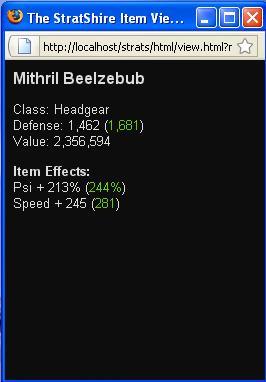 We notice that each stat of the item has a regular stat and another green one in brackets. As an adventurer grows in level, they will become more and more proficient using items and this proficiency affects the effects of their bonuses. The green number being higher than the regular bonus stat in this example indicates that the character has fully mastered the item (and might look for an item with higher stats soon).
Lets now take a look at the IE bonus, IE Min and IE max in the Other-Tab of Inventory where we can check our IE stats. A simple example: If we manage to raise our IE bonus to 100%, our little level 60,000 character would be able to use items as if they were level 120,000. Besides that, he worked hard on getting the value of IE max to 125% (originally it was 115% in the beginning) so he can get up to 125% effectiveness from an item.
New Features
Touch of Hope
If you equip several items that harmonize well in quality, you might receive a bonus for that. This bonus increases with number of similar items (4,5 / 6,7,8 / 9,10). The following bonuses are percentages:
Camps and Forts
Strange Bio-void Machine
The operator card gets destroyed in any case after any attempt. If the attempt fails, and if either probability is below 25, or both the item effectiveness and probability are below 50, there is a chance that the item gets destroyed.
What that means is! If you have an item with a probability of greater than 50% then your item will not break at all. However if it is lower than 50% there is a chance of it destroying your item. AND if it is lower than 25% there is an extreme chance that your item gets destroyed!
Letter-man
Tournaments
New Spells
Pickpocket
Other players may try to arrest a thieves who display with red stars on the map. If successful, the thief is transported to jail and the player receives a reward depending on the level-quotient. If not successful, the player must continue from the attune-spot.
Smithy
Monopoly Contest
Temple of Enchantments
Living Skills
Reincarnation
CAUTION Please make sure you read what happens when you reincarnate, as changes do happen to your account!!!
As of writing this the requirments for the first one are as follows
Upon reincarnating you will be set to level 1 and the game will take 50% of your base stats. After that you will gain a 20% increase on your normal race stats per level. So if you gained 12 str before you will gain 14 str instead.
As of writing this the requirments for the second one are as follows
Upon reincarnating you will be set to half your levels.(at 50,000 you will be set to 25,000) and the game will take 25% of your base stats period. After which you will gain an additional 20% increase on your stats per level. So if you gained 14 str before you will gain 17 str instead.
Reincarnation has gone through a fundamental change which nulls everything above!.
Reincarnation is now exactly that. You will reincarnate your character and go back to the state that you started the round with. This means you lose EVERYTHING, with the exception of most plat gear. Since you worked hard or donated to get this gear I can't just get rid of it. The only exception to that rule is Pets. Those you will lose and be provided the single plat to get a new one at the start. The following are some items about the new system.
The intent is to give players the ability to reset their own accounts to continue playing while waiting for reset. In the future zones after the reincarnation area will be harder and require you to reincarnate to move up through some zones. At this time that portion is still in the planning stages.
Pets
Pet Eggs / Hatching
Every new character gets a pet egg for free to start with.
Your pet egg stats with stamina 1, experience 0, and level 0. The stamina will rise automatically as long as you have the egg equipped. Your goal is to get to 1000 stamina. Then you can press a button to get it to level 1 (child pet). It already possesses some stats. These stats are counted towards your characters stats (after calculating the items) as long as the pet has stamina. Each pet has one or two terrains where it is less effective. You can not unequip the pet from level 1 to 3. Besides that, one can only drop pets at level 4.
Child Pets / Feeding
After your pet hatched, you may choose a name for it (this is also possible each time the pet stamina is 66).
Adult Pets / Levelling
Once you finished the last feeding of your level 19 pet, a pet will turn to a level 20 Adult. Adult pets have the chance to gain a second skill - a major one - and two slots for accessories.
pet Stats, Skills and Accessories
Your pet will improve with each level. Besides the Health- and Mana-bonus it contributes a typical stat which depends on its type. At a higher level it may develop a 4th stat. From level 10 to level 20, you may train your pet each time the remaining feeds get 2 (train right after feeding).
...completing later...
Pet Name HP MP 3rd Stat 4th stat 1st Skill 2nd Skill 1st Terr.Rest. 2nd Terr.Rest. Kodophant 8% 2% Defense% Toughness Master Def. Marshes Swamps
Hawkpard 3% 6% Damage% Nimbleness Master Melee Dreamland DL II
Hawkpard: "protect_attack" // protection against physical attacks
Unicorn: "health" // heal health
Pegasus: "protect_cast" // protection against magic
Coredragon: "mdrop" // up to +25% drop quality while stamina is 100%, but -25% while it is 0
Phoenix: "mana" // heal mana
Psi Tiger: "cast" // (4th) magic attack
Mambowoki: "attack" // additional physical attack
Cute Fishie: "specs_trample" // up to 50% damage to enemy (specs)
pet for Sale
You may buy pet eggs in the Misc-shop for a low price. Neither pet eggs nor pets can be sold to shops.
Pets at level 10 or higher can be traded using the trade center, only TL 1 is needed. This might be very useful as some pets combine better with certain character classes as others.
CONTACT INFORMATION
There is a forum thread for reporting bugs, but just make sure it hasn't already been reported.
Contact
If you need to contact an admin for some reason, either PM them in-game, or email them (contact form on login page).